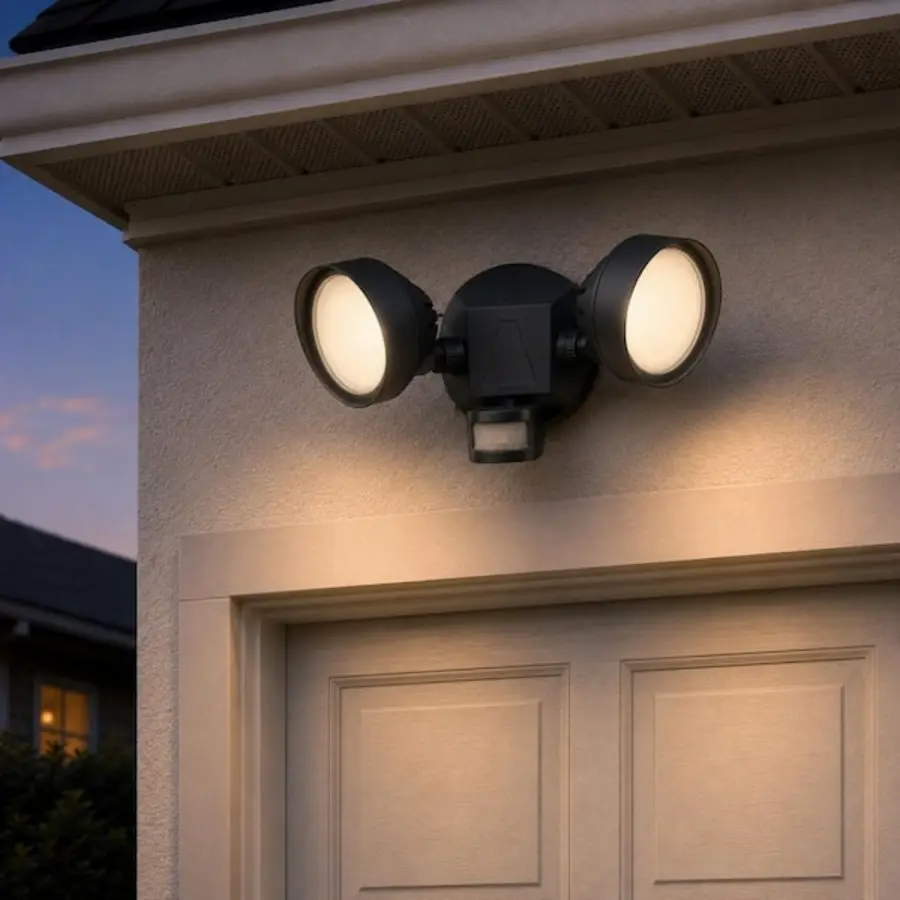
An outdoor motion sensor light that works in daylight is possible, but many ordinary motion fixtures are intentionally designed not to do this. Their built-in photocell, sometimes called a dusk-to-dawn sensor or daylight sensor, blocks the light from switching on when ambient light is already high.
For a porch-ceiling light that must operate whenever someone approaches—even on a sunny day—look for one of three things: an adjustable daylight or lux threshold, a setting that disables daylight inhibition, or a separate outdoor-rated motion sensor controlling the light. If the real goal is a delivery alert, a separate sensor that reports motion to your automation system is often more dependable than using the light's electrical load as the only signal.
Why most outdoor motion lights do not turn on during the day
A motion-controlled fixture commonly combines two separate controls:
- A motion sensor, often a passive infrared (PIR) sensor, that looks for changes in heat patterns caused by a person, animal, or vehicle moving through its detection area.
- A photocell or ambient-light sensor that decides whether the area is dark enough for the fixture to operate.
The photocell is there to avoid wasting energy and creating unnecessary daytime light. On many integrated porch lights, it is not optional. The fixture may detect movement perfectly well in daylight but still refuse to energize the lamp because its daylight sensor considers the area bright enough.
This is why a listing that simply says “motion sensor” is not enough. It may mean “motion after dark.” A fixture described as dusk-to-dawn with motion sensing is especially likely to have daylight inhibition as part of its normal operation.
A test mode is not proof that a fixture supports everyday daytime activation. Some fixtures temporarily ignore the daylight sensor in test mode so the installer can check coverage in daytime, then return to night-only motion operation when placed in Auto mode.
The three practical ways to get daytime motion activation
1. Choose a fixture with an adjustable daylight threshold
Some motion fixtures have a daylight adjustment, usually marked with a sun symbol, moon symbol, lux value, or a range from daylight to darkness. At the highest daylight setting, the fixture may be allowed to respond during brighter conditions.
This is the most compact approach because the sensor and light are in one unit. It can suit a porch where the only requirement is for the light to turn on briefly whenever someone arrives.
Before buying, confirm in the product manual—not only the product title—that the daylight setting can permit operation in bright daylight. Terms such as “adjustable lux,” “daylight threshold,” “daylight sensing,” and “daylight override” are worth investigating, but manufacturers use these terms differently. A broad adjustment range does not always mean the photocell can be fully bypassed.
Potential drawback: the sensor still has to be positioned where the fixture is positioned. A decorative ceiling light may be visually right for the porch but poorly placed for detecting someone on the approach path.
2. Choose a fixture with a photocell-disable or all-day motion setting
A smaller group of fixtures provides a distinct setting for motion activation at any time of day. This may be described as “24-hour motion,” “all-day motion,” “day/night operation,” or an option to disable the photocell.
This is the clearest integrated-fixture choice when the light itself must switch on as an event signal. It avoids relying on a partially adjustable dial whose behavior may be difficult to interpret after installation.
Check the control options carefully. Some products use “manual override” to mean the fixture can be held on continuously from a wall switch; that is not the same as allowing motion-triggered operation during daylight. Others offer a selectable day/night mode but only through a remote control or a mobile app.
For a delivery-alert use, consider whether frequent daytime activation will be acceptable. A light turning on for each person, pet, passing vehicle, or visitor may be useful as a signal, but it may also be distracting and shorten the practical life of an integrated LED fixture if triggering is excessive.
3. Use a separate motion sensor and treat the light as one output
For the greatest control, separate the motion sensor from the porch light. The sensor can be mounted where it sees the route people actually take, while the fixture remains where it gives the porch the best illumination.
The separate sensor can control the light directly, report to a smart-home hub, or do both, depending on the equipment and installation design. This arrangement is often the best fit when a homeowner wants daytime lighting, delivery notifications, a camera action, and different behavior after dark.
For example, an automation could use one outdoor motion event to:
- Turn the porch light on for a short daytime interval.
- Send a phone notification during expected delivery hours.
- Turn on a brighter entry scene after dark.
- Avoid alerts when household members are expected home.
- Log activity without leaving the porch light on continuously.
This is more flexible than depending on the logic embedded in a decorative porch fixture. It also makes future replacement easier: the light and the sensor do not have to be replaced as one system.
Ceiling mounting changes the detection problem
A porch ceiling is not automatically a bad place for a motion light, but it creates limitations that are easy to miss when shopping online.
PIR sensors generally detect movement best when a person moves across their sensing zones rather than directly toward the sensor. A person walking up a path across the sensor's view may be detected earlier than a person walking straight toward a front door directly below it.
A central ceiling light can also be too far back under the porch roof. Its sensor may see the doorstep and a small area near the door but miss a person approaching from the sidewalk, driveway, or front steps. Conversely, a sensor aimed too broadly may trigger from public foot traffic, neighboring driveways, or cars passing on the street.
When evaluating a porch ceiling motion sensor light, look for these details:
| Feature to assess | Why it matters for a porch ceiling |
|---|---|
| Detection pattern | A coverage diagram is more useful than a claimed maximum range alone. Look for coverage that reaches the actual approach route. |
| Sensor orientation | A fixed downward-facing sensor may have a very different useful zone from an adjustable sensor head. |
| Mounting-height guidance | Detection performance changes with mounting height. Compare the maker's stated range with your actual ceiling height. |
| Sensitivity control | Helps reduce triggers from small animals, moving plants, or activity beyond the porch. |
| Hold-time adjustment | Lets the light remain on long enough to be useful without staying on after every brief trigger. |
| Daylight control | Confirm whether daytime activation is permitted in normal operating mode. |
A useful planning method is to stand where a delivery person would first enter your property, then walk the likely route to the door. Mark the point at which you want the sensor to react. That point—not merely the doorway—should fall within the fixture's meaningful detection zone.
Using the light as a delivery alert
A porch light switching on can be used as a signal for Home Assistant or another automation platform, but it is not always the best sensor event to monitor.
Power monitoring: workable, but indirect
With Home Assistant motion light power monitoring, a smart relay, energy-monitoring device, or compatible switch may detect when the light begins drawing power. An automation can then interpret that change as a possible motion event and send an alert.
This approach can work when the fixture has no smart connectivity and its light output reliably follows motion. However, it reports that the lighting load changed, not that a person was definitely detected. The distinction matters.
A power-based alert may be misleading when:
- Someone turns the light on manually.
- The fixture enters a manual-override state.
- A dusk-to-dawn setting turns the light on at sunset.
- The lamp is already on from a previous trigger.
- The fixture dims rather than switching fully on.
- An integrated fixture has a low standby draw that is difficult for the monitoring device to distinguish.
If a delivery alert is important, a dedicated motion sensor, doorbell event, camera-based person event, or parcel sensor can provide a more direct automation trigger. The porch light can still be one helpful response rather than the sole source of information.
A practical automation approach
Use motion as an initial event, then add conditions that reduce nuisance notifications. For example, a system might notify you only during a chosen daytime period, only when the door has not just been opened by a household member, or only after the sensor has been clear for a set period before the new detection.
Avoid making safety-critical decisions from one motion event. Outdoor sensors can miss a slow approach, react to animals, or trigger from changing heat conditions. They are useful convenience devices, not reliable identification systems.
Questions to ask before buying
Use the product manual and specification sheet to answer these questions before choosing a porch ceiling motion sensor light:
- Can motion activate the light in full daylight during normal use? Look for a direct answer, not just a daytime test mode.
- Can the photocell be disabled or adjusted to a very high threshold? If not, assume the fixture is night-only.
- What is the sensor's coverage pattern at the intended mounting height? A claimed range without a pattern tells you little about a ceiling installation.
- Can the sensor be aimed? An adjustable sensor is useful when the fixture sits behind the porch edge.
- Does it have adjustable sensitivity and hold time? These controls help balance missed detections against nuisance triggering.
- What happens after a power interruption or wall-switch cycle? Some fixtures enter override or reset modes that can interfere with automation.
- Is the fixture suitable for its exact outdoor location? Check the manufacturer's environmental-location guidance and verify the installation requirements for the porch exposure.
For broader guidance on enclosure protection terminology, see our guide to IP ratings for lights.
Common selection mistakes
Assuming “motion sensor” means all-day operation
This is the central mistake. Most exterior motion lighting is intended to save energy after dark, so daytime lockout is common rather than unusual.
Buying by maximum detection distance
A long advertised range is not a guarantee that the sensor will catch a person walking toward the porch. The shape, angle, and mounting position of the sensing field matter more.
Treating manual override as photocell override
Manual override commonly holds a fixture on continuously. It does not necessarily allow the motion sensor to operate in daylight, and it may make power-monitoring alerts less useful.
Putting smart bulbs in a sensor-controlled fixture
Smart bulbs need continuous power to remain connected. A motion fixture that cuts power after its timer expires can make those bulbs unavailable or unpredictable. If smart control is the goal, a separate sensor and a compatible always-powered lighting arrangement are usually easier to manage.
Ignoring physical installation constraints
Outdoor ceiling fixtures and sensors need suitable mounting, weather exposure protection, and safe electrical connections. Product instructions and local requirements may differ according to the location and existing wiring. If wiring changes, new control equipment, or uncertainty about the mounting location is involved, ask a qualified electrician to assess the installation and verify current local requirements.
The simplest decision
Choose an integrated daytime motion activated outdoor light when you want a straightforward porch light that visibly turns on whenever someone approaches and the fixture's sensor coverage suits the entry path.
Choose a fixture with an explicit all-day mode or photocell-disable setting when daytime activation is non-negotiable.
Choose a separate outdoor-rated motion sensor when delivery alerts, Home Assistant automations, camera actions, or precise sensor placement matter more than having everything built into one decorative ceiling fixture. For most alert-focused setups, that separation provides the clearest signal and the most room to adjust the system later.
References
- What Is the Difference Between Photocell and Motion Sensor Light?. (n.d.). https://www.lumetrolight.com/article/what-is-the-difference-between-photocell-and-motion-sensor-light.html
- Photocell and Motion Sensors for Outdoor Lighting - Jarvis Lighting. (n.d.). https://www.jarvislighting.com/collections/photocells-motion-sensors-and-controls
- 7 Best Outdoor Motion Sensor Lights, According to Our Testing. (n.d.). https://www.bobvila.com/articles/best-outdoor-motion-sensor-lights
- How To Test an LED Motion Sensor Light During Daylight. (n.d.). https://www.ledlightexpert.com/how-to-test-led-motion-sensor-light
- Craftersmark Outdoor Ceiling Light with Motion Sensor - Amazon.com. (n.d.). https://www.amazon.com/clp/B0D9BRWX9R
- 8 Best Outdoor Motion Sensor Lights Of 2026 That Make Sense. (n.d.). https://www.youtube.com/watch?v=c72XTDyDI6I&vl=en
- How to Adjust Motion Light Sensor Settings. (n.d.). https://www.homedepot.com/c/ah/how-to-adjust-motion-light-sensor-settings/9ba683603be9fa5395fab907e472025
- Motion Sensor Outdoor Ceiling Light LED Flush Mount Porch .... (n.d.). https://www.amazon.com/Outdoor-Exterior-Waterproof-Entryway-Farmhouse/dp/B0FGHC18R3